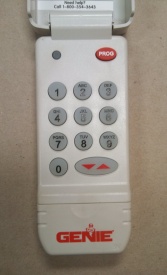
How to program or change the code on a Genie or Overhead garage door opener keyless entry code pad.
Note: The process may be easier if you have an assistant or helper enter the code into a new keyless when you're ready after pushing the Program Set Key if the keyless is already mounted on the wall.
Keyless Programming Steps for Only One Garage Door Opener:
Scroll down the page if you need to program your single keyless entry to two or three doors at your location.
1) Open the keyless cover.
2) Push and release in order the 3-5-7 keys and then push the Program key on the keyless entry.
3) Enter the PIN number you want to use which can be 3 to 8 numbers long in any order or combination. Then press the Program key on the keyless entry again.
4) Your Genie or Overhead keyless entry is now ready to be programmed into the opener if you only want to use it for one garage door at your location.
Steps for Programming Only One Garage Door Opener for the First Time:
1) Locate the Program Set key or Learn Code button on the garage door opener motor head. The Program Set key is located on the bottom of the opener cover but the Learn Code button may be located under a light bulb lens cover or under the operator motor cover itself.
2) If you have a Program Set key proceed to step #3. If you don't have a Program Set key proceed to step 4
3) Push and hold the Program Set key for 2 seconds. There is a round LED and a long LED to the left of the Program Set key which the round LED will turn blue and then turn off. At the same time the long LED will be purple and flashing. Skip step 4 and proceed to step 5.
4) Find the Learn Code button and push it momentarily and the round LED above the Learn Code button will begin to blink.
5) Enter your PIN (or have your assistant enter it) into the keyless entry and push the Up/Down key. The garage door opener LED(s) will now stay on steading.
6) Push the Genie keyless entry Up/Down key again and the opener LED(s) will turn off.
7) Push the keyless entry Up/Down key a third time and the door opener should now start to run so make sure you're not standing directly under the open door.
Once the door starts to run pushing any key on the keyless entry will stop & reverse the door if it's closing or will stop the door completely if it’s traveling in the open direction. Once the door has stopped, pushing any key again within 30 seconds (keypad back light turns off) will also activate the door again.
Note: If at any time during the keyless programming process if the Red LED on the powerhead starts to blink rapidly an error has occurred. In that case you'll need to start programming the garage door opener over again from the beginning. You do not need to reset the PIN in the keyless entry.
8) To use your keyless entry enter your PIN on the keypad and push the Up/Down key.
Keyless Programming Steps for Two or Three Garage Door Openers Using One Keyless Entry:
1) Open the keyless cover.
2) Push and release in order the 3-5-7 keys and then push the Program key on the keyless entry.
3) Enter the PIN number you want to use which can be 3 to 8 numbers long in any order or combination. Then press the Program key on the keyless twice.
4) Push either the number 2 or 3 on the keypad depending on how many garage door openers you want to operate and push the Program key again. Once the keypad goes dark as in the light turns off you are now ready to program the garage door openers.
Steps for Programming Two or Three Garage Door Openers for the First Time:
1) Locate the Program Set key or Learn Code button on the garage door opener motor head. The Program Set key is located on the bottom of the opener cover but the Learn Code button may be located under a light bulb lens cover or under the operator motor cover itself.
2) If you have a Program Set key proceed to step #3. If you don't have a Program Set key proceed to step 4
3) Push and hold the Program Set key for 2 seconds. There is a round LED and a long LED to the left of the Program Set key which the round LED will turn blue and then turn off. At the same time the long LED will be purple and flashing. Skip step 4 and proceed to step 5.
4) Find the Learn Code button and push it momentarily and the round LED above the Learn Code button will begin to blink.
5) Enter your PIN (or have your assistant enter it) into the keyless entry and press the Up/Down key. The garage door opener LED(s) will now stay on steading.
6) Push the number 1, 2, or 3 on the Genie keyless entry keypad for the garage door opener you want to program. Press the Up/Down key again and the opener LED(s) will turn off.
7) Push the keyless entry Up/Down key a third time and the door opener should now start to run so make sure you're not standing directly under the open door.
8) Go back to step 1 in this section and start programming your second garage door opener in the same manner. (If you have a third opener you will need to repeat the same steps over again.
Steps for Changing Your Genie Keyless Entry PIN
1) Enter your current PIN number and push the Program key.
2) Enter your new PIN number number and push the Program key again and your done.
Steps for Resetting Your PIN When You Can't Remember the Original PIN Number
1) Push and hold the keypad Up/Down key and the Program key simultaneously for approximately until the LED on the keypad blinks slowly and turns off. Your PIN has been completely erased once the the LED has turned off.
2) You then need to go back to the beginning and program the keyless entry in the same manner as you programmed it for the first time


If you are a IDA Garage Door Dealer (Members Only) & don’t see your company on our IDA dealer page for your state(s) please contact us and we will make sure to add you during an update.
© 2002-2020 Greg Smith | All Rights Reserved
Site Owned & Maintained By:
Greg Smith
Ft Myers, FL


Garage Doors & Garage Door Openers,
The Best Dealers To Your Door!
We take great pride in this web site. If you should find anything that is not working properly, please contact us with a note of what was not working, along with the type of browser you are using, the version of the browser, and your connection speed. We hope you find our site a worthwhile experience!