How to check and adjust the garage
door opener photo cell sensors.
The photo cells on a garage door opener will never affect the opening of your door in any manner whatsoever therefore if your door doesn't open it is not a problem with the photo-cell sensors.
In many forums I quite often see postings where someone is having a problem with their garage door opener opening the garage door & quite often someone will respond for them to check the sensors at the bottom of the track. However this will never be the cause because in fact they do not even need to be hooked up at all during the opening cycle. However they will stop the door from closing normally.
If your garage door will not close at all the first thing you should try is to close the door by maintaining constant pressure on the wall button. This is an override feature so that you can secure your home until you can have the problem resolved. However the remote controls do not have this capability & therefore it can only be done from inside the garage. If the wall button does work in this manner the photo-cells are usually what is causing the problem. The problem could be that they are blocked by something, sunlight is interfering with them, the lenses are dirty, they are out of alignment, the wire to them is shorted, or some part is defective.
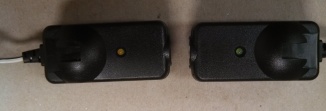
In the United States both LED lights on the photo-cells should be lit solid when aligned correctly, functioning properly, and not blocked. When they are blocked one of the sensors will not be lit up. If they are not blocked and not lit up they may be out of aligned, one or both may be defective, the wire(s) leading to them may be broken or shorted, or it may mean the main logic board on the opener is not sending out the proper voltage.
In other countries where they are more energy conscious than the United States the LED lights may be off when functioning properly and lit solid when they are not. It may only be saving pennies a year per unit but when there are millions in operation country wide it would be a wise decision for the US to also make that change and I’ve heard that we are starting to lean toward going in that direction.
On your Chamberlain, Craftsman, or Liftmaster opener they also have a flashing LED code on the motor head that may help you in trouble shooting the problem and you should refer to their chart for assistance. Unfortunately all openers do not have this built-in feature but there are still some steps you can take on your own before you make a garage door opener service request.
1) Check the obvious for anything blocking the beam & move the object if necessary.
2) If the problem only happens regularly at certain times then sunlight is the most likely suspect. Bright sunlight will sometimes “wash out” the receiving unit to where it can’t “see” the beam from the transmitting unit. Usually a better solution to trying to build shades over them is to simply swap the two units with each other to get the receiving photo-cell out of the direct sunlight.
3) Clean both lenses to wipe away dirt or spider webs.
4) Check to see if the lights on both sensors are lit up fully.
If one of the lights is dim or out try moving one of the sensors slightly to see if the LED will come back on or get brighter.
5) Check to make sure the wires are firmly connected on each sensor & the motor head unit.
6) Check the full length of the wires to make sure there are no staples that are too tight or that one of them wasn’t actually placed thru the wire itself.
If your wires are run above the ceiling it may be easier to disconnect the wires temporarily & and connect new wires outside of the ceiling to see if the opener works properly. If the unit still doesn’t work the original wires are probably not the problem.
7) If all else fails most likely their is a defective part on your garage door opener.
However you can not be 100% sure that one of the sensors is bad. The main logic board supplies the power to them so it is possible that the board and/or the sensors could be defective. If you feel lucky you could try changing the sensors but it may be time to put in a garage door opener repair ticket so you don’t have to pay for new parts that are not needed.


If you are a IDA Garage Door Dealer (Members Only) & don’t see your company on our IDA dealer page for your state(s) please contact us and we will make sure to add you during an update.
© 2002-2020 Greg Smith | All Rights Reserved
Site Owned & Maintained By:
Greg Smith
Ft Myers, FL


Garage Doors & Garage Door Openers,
The Best Dealers To Your Door!
We take great pride in this web site. If you should find anything that is not working properly, please contact us with a note of what was not working, along with the type of browser you are using, the version of the browser, and your connection speed. We hope you find our site a worthwhile experience!